Automate Your Boring Tasks Inside Your Own Browser
Free, open-source AI Extension for Chrome. Research, fill forms, and send outreach using your signed-in accounts. Start free with Gemini.
OpenBUA was told to find 2 students from the USA and pitch them my app, petedoro.com, via email.
Made for everyday people
Same Forms. Same Clicks.
Get Your Time Back.
Claude Code helps programmers get more done. OpenBUA brings that kind of help to everyone who uses a browser. Let it fill long forms, copy information, and handle repetitive clicks in the background while you focus on work that matters. Just tell it what you need. No coding or AI knowledge required.
Type. Copy. Paste. Repeat.
“Fill out this application using my details.”
You ask. It handles the busywork. You get on with your day.
- 01Install in one click
- 02Say what you need
- 03Focus on what matters
Free extension. Start with the Gemini free tier. No technical experience needed.
OpenBUA Got a New Update
OpenBUA MCP
Your Agents.
Your Own Browser.
Connect your AI agents to your own browser through OpenBUA MCP. Let them work with the tabs, tools, and signed-in accounts you already use.
- Works with MCP-compatible clients
- Uses your existing browser sessions
- Browse, research, and fill forms
 Codex
 Claude Code
 Cursor
 Antigravity

OpenBUA MCP
The bridge to your browser
Your tabs
Your accounts
Your workflows
Everything your browser can do, automated.
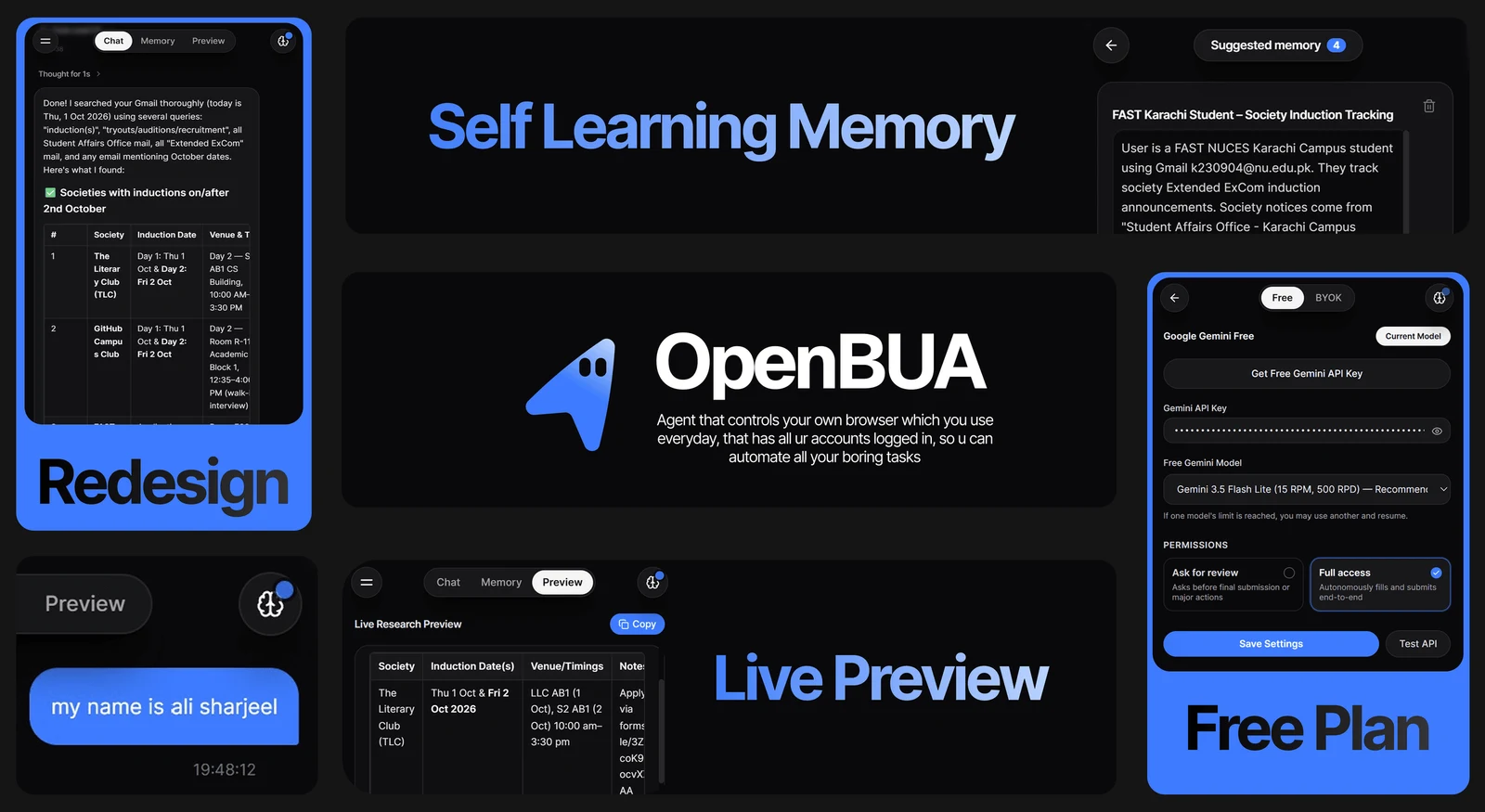
OpenBUA turns your daily browser into an autonomous agent that navigates, researches, fills forms, and drafts outreach without third-party server proxies.
100% In-Browser Execution
Runs entirely client-side as a Manifest V3 Chrome Extension. Zero remote cloud servers, zero Docker containers, zero compute bills.
Pre-Authenticated Sessions
Operates directly in your everyday browser with active logins for Gmail, LinkedIn, GitHub, Notion, and CRMs. No 2FA bypass hurdles or cookie exports.
Autonomous Web Research
Navigates search engines, platforms, and directories across multiple pages. Evaluates candidates and compiles verified structured data automatically.
Live Research Preview Tab
Incremental write-as-you-go streaming preview. Markdown tables stream row-by-row with an automatic repair engine so you never wait for black-box tasks.
Self-Learning Memory System
Extracts facts, contact details, and workflows as you browse. Features Global Memory for your background and Tab Memory for isolated project notes.
Synthetic Form Filling
Matches job portals (Greenhouse, Lever, Workday) and complex wizards against your profile with native synthetic event chains (input, change, blur).
Direct Webmail Outreach
Drafts, reviews, and dispatches genuine emails directly through your logged-in Gmail or Outlook. No SMTP credentials, OAuth permissions, or email APIs.
Optional Full Access
Choose Full access in Settings to let OpenBUA send, post, and submit without review prompts. Work can continue while you sleep with your computer awake and browser running.
Human-in-the-Loop CAPTCHA
Detects bot verification challenges (Cloudflare Turnstile, Google reCAPTCHA, hCaptcha) with a 1-click in-panel alert to solve and automatically resume.
Bot Shield Immunity
Runs as your genuine local browser with authentic fingerprints, bypassing Cloudflare, reCAPTCHA, and bot shields that block headless cloud scrapers.
Why OpenBUA beats Browser-Use
Cloud agents struggle with logins, captchas, and privacy leaks. OpenBUA eliminates the entire server layer by running where you already browse.
| OpenBUAYour browser | Browser-UseCloud browser |
|---|---|
| Session authentication | |
| Uses your signed-in accounts | Re-login, 2FA, or cookie imports |
| Infrastructure | |
| Chrome extension. No servers. | Docker, cloud VMs, or remote browsers |
| Data privacy | |
| Runs locally; task context goes to your AI provider | Browsing data passes through remote servers |
| Cost & pricing | |
| Free extension + Gemini free tier. Optional BYOK. | Cloud compute + proxy costs |
| Bot detection | |
| Runs in your real browser | Headless browsers can trigger bot blocks |
| Captcha handling | |
| Alerts you to solve challenges | Third-party captcha integrations |
| Real-time feedback | |
| Live results as the agent works | Summary after execution |
| Knowledge retention | |
| Global and per-tab memory | Scratchpads reset each session |
| Capability | OpenBUA (Local Extension) | Traditional Cloud Browser-Use |
|---|---|---|
| Session Authentication | Uses your active, signed-in sessions (Gmail, LinkedIn, GitHub, CRM) | Requires re-authentication, 2FA bypass, or fragile cookie imports |
| Infrastructure | 100% Client-Side Chrome Extension (Zero servers) | Spun-up Docker containers, cloud VMs, remote Playwright instances |
| Data Privacy | Browser execution and memory stay local; task context goes to your AI provider | Browsing traffic and page snapshots stream through remote servers |
| Cost & Pricing | Free extension + Gemini free tier, with optional Bring Your Own Key (BYOK) | Per-minute cloud compute pricing plus proxy bandwidth costs |
| Bot Detection | Bypasses headless blocks by running as a genuine local browser | Regularly blocked by Cloudflare, reCAPTCHA, and bot shields |
| Captcha Handling | Human-in-the-Loop alert banner lets you solve challenges in 1 click | Requires expensive third-party captcha-solving API integrations |
| Real-Time Feedback | Live Research Preview tab streams tables incrementally as agent works | Black-box execution until final summary is returned |
| Knowledge Retention | Proactive self-learning memory with Global and Tab memory tiers | Ephemeral scratchpads discarded after each session |
Real tasks. Your own browser.
Find your next role, reach your next customer, or turn scattered tabs into useful research. Choose a workflow and make it yours.
Find better-fit jobs. Apply with your resume memory.
Scout job openings, compare roles with your experience, and fill applications using your resume and saved profile in your own browser.
Explore job applications →Find your next users. Start the conversation.
Research potential users, draft personalized email outreach, and prepare Reddit, LinkedIn, or X posts for your app using OpenBUA.
Explore app promotion →Turn browser research into a qualified lead list.
Find relevant prospects across websites and directories, organize verified lead research, and draft outreach in Gmail or Outlook with OpenBUA.
Explore lead generation →Go from open tabs to a research brief.
Compare competitors, research products, and summarize multiple websites into sourced tables with OpenBUA's AI browser agent and live preview.
Explore web research →Fill the form. Keep your context.
Fill repetitive forms, onboarding flows, and application portals using saved profile memory and documents with OpenBUA in your browser.
Explore form filling →Frequently asked questions
Here is what to know about getting started, the free tier, and how OpenBUA works in your browser.
Is OpenBUA free to use?
Yes. OpenBUA is free to download and open source. You can try browser tasks with the Gemini free tier using a free Google AI Studio API key. Free-tier usage limits apply; optional paid AI providers follow their own pricing.
Do I need a paid API key or subscription?
You can start with a free Gemini API key from Google AI Studio. OpenBUA's Settings includes a link to get one. Connect the key and choose a model available on your free tier. You can optionally connect another supported AI provider with your own key.
How do I get OpenBUA?
Use Install for Free to open the official Chrome Web Store listing and add the extension to Chrome. OpenBUA is also open source on GitHub, where you can find the source code and releases.
What can I automate with it?
OpenBUA can research websites, scout leads, help fill job applications using resume memory, complete repetitive forms, draft email outreach, and prepare social posts for platforms such as Reddit and LinkedIn. Give it a specific goal and the context it should use.
Does it use the accounts I am already logged into?
Yes. OpenBUA works in your everyday browser with your existing signed-in sessions. You sign in to websites normally, then ask it to work on those pages. If a site asks for a login or CAPTCHA, handle that step in your browser and continue the task.
Is my data kept on my device?
Browser actions run on your device, and saved memory is stored locally by the extension. Relevant task context is sent to the AI provider you configure so it can generate responses. That provider's data policies apply to the information it receives.
Will it send emails or publish posts without asking?
You choose the permission mode in Settings. Ask for review pauses before final submissions or major actions. With Full access, OpenBUA can carry out your task, including sending, posting, and submitting, without waiting for a separate approval each time. You can still request drafts or specific stopping points in your instructions.
Can OpenBUA work while I sleep?
Yes. Enable Full access and give it a task so it can continue without waiting for approval on each final action while you are away or asleep. Your computer must stay awake and your browser must keep running. Login challenges, CAPTCHAs, or missing information may still need your input. It does not keep running after the browser closes or the computer sleeps.
Which browsers does it support?
Start with the desktop Chrome extension. The project also supports compatible Chromium browsers with side-panel support, such as Microsoft Edge and Brave. Check the browser's extension support before installing. It is designed for desktop browser workflows.
Choose your first task in use cases, or visit the free download page.
Automate your boring tasks inside your own browser
Download OpenBUA for free from the Chrome Web Store. Try your first browser tasks with the Gemini free tier.
Choose Ask for review, or enable Full access to let it work autonomously while you're away. Keep your computer awake and browser running.